
Using Message Types
In order to see messages pop up in the timeline you will need to create these, go to Message Types
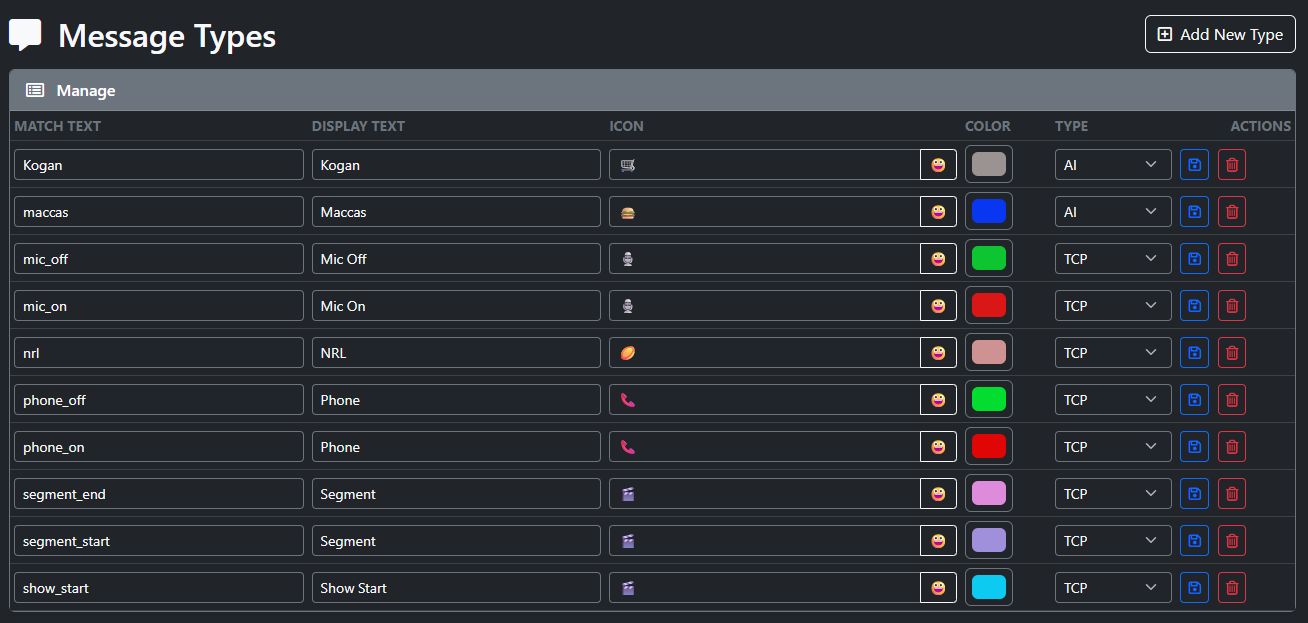
Creating New Messages
- Select Add New Message
- A new row will appear
- Match Text
- This si the Text we will look for in the message
- Display Text
- This is what we display in the timeline
- Icon
- Selecy the emoji and a new window will open and select your emoji
- Color
- Color for the message
- Type
- Is this TCP or AI
- TCP is from a TCP message sent to the system
- AI
- This si where we scan the Transcript for words
- Is this TCP or AI
- Action Items
- Save
- Saves the newly added row
- Delete
- Deletes the row
- Save