
Setting up a new channel
To create a new channel navigate to the Channels page
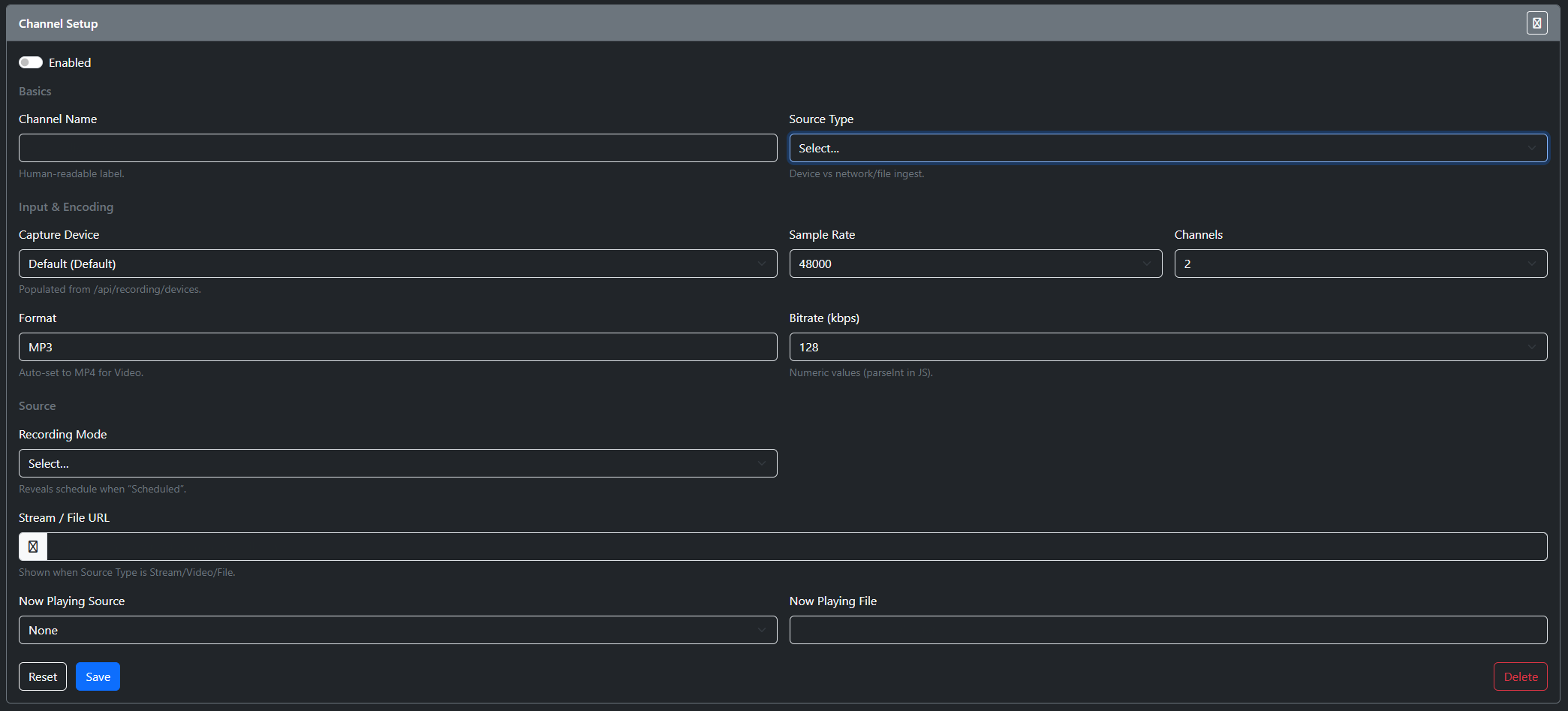
Channel Setup
- Enabled / Disabled
- Remote - if you have a machine capturing audio locally for this channel, enable this.
- Channel Name
- Friendly name for your channel
- Source Type
- Device
- This is if you want to record from your audio card
- Stream
- This is you want to capture an audio stream
- Video
- This is if you want to capture a video stream
- Device
- Capture Device
- If you have selected Device then you can select a Capture Device
- Sample Rate
- Sample Rate to record in
- Channels
- Number of Channels to record
- 1 - Mono
- 2 - Stereo
- Number of Channels to record
- Format
- Format to record in
- Bitrate
- Bitrate of the recording
- Recording Mode
- Manual
- You start and stop the recording
- Continuous
- 24/7 recording
- Schedule
- Days / Time to record
- Manual
- Now Playing Source
- The URL of the Stream for either video or audio
- Now Playing Source
- API
- File
- Now Playing File
- The file must be in this format
- [Station]_{yyyyMMdd}.txt
- Sample
- Station Name | Date Time UTC | Artist | Title | Category | Color HEX
- Stream_Sun|2025-10-13T23:57:26.2520369Z|Tove Lo|Habits| |209|{}|Music|#FF0000
- The file must be in this format
- Stream URL
- URL of the stream to capture